AI-tool: Lander Page Maker
AI-tool: Lander Page Maker
https://ai.mihajlo.mk/tools/lander-page-maker
A landing page is one of the most critical components of any digital product, campaign, or business offering. It serves as the initial point of contact where users grasp the essence of what's being offered. This is the juncture where the decision is made: will they leave their contact information, make a purchase, schedule an appointment, join a waitlist, or simply close the page?
The challenge lies in the fact that a truly effective landing page is far more than just an aesthetically pleasing design. It necessitates a clear and compelling message, a logical structure, a well-defined call-to-action, relevant sections, a functional lead form, a cohesive visual style, appropriate color palettes, impactful imagery, elements of trust, and a responsive layout. Crucially, it requires frontend code that is robust enough to be immediately downloaded, edited, and deployed.
This is precisely where Lander Page Maker steps in. It is an AI-powered wizard designed to guide users through a structured process, culminating in the generation of a downloadable landing page package. This tool aims to bridge the gap between a raw idea and a professionally structured, ready-to-deploy frontend asset.
What is Lander Page Maker?
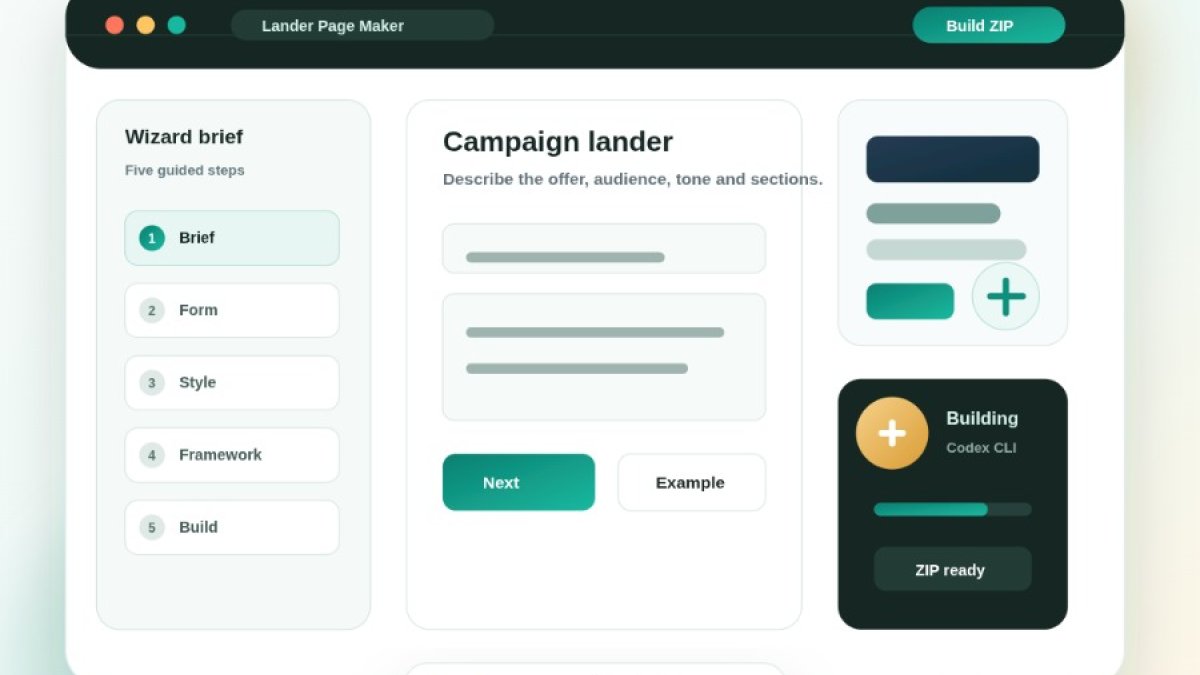
Lander Page Maker is an AI tool engineered for the creation of landing pages through a guided wizard interface. Instead of presenting users with a blank prompt field and expecting them to formulate the perfect instruction, the tool proactively leads them through a series of essential steps:
- Defining the name of the landing page.
- Crafting a description and prompt outlining the desired page structure and content.
- Specifying whether the page should include a lead capture form.
- Detailing the specific fields required within the form.
- Indicating preferred colors and overall visual style.
- Defining the type of photographs or visual direction the page should embody.
- Selecting the frontend framework to be utilized.
- Initiating the build process.
- Previewing and downloading the generated ZIP package.
The output is a complete frontend package that can be downloaded, reviewed, modified, and utilized as a foundational element for a live landing page. This structured approach ensures that the generated output is not merely conceptual but a tangible, actionable asset.
Why is it Better Than a Generic AI Prompt Field?
Many AI tools offer a single input field, expecting users to possess the expertise to articulate precisely what they need. However, the reality is that most users do not simultaneously operate as landing page strategists, copywriters, designers, and frontend developers. Lander Page Maker addresses this by adopting a wizard-based approach.
Rather than leaving users to navigate these complexities alone, it systematically asks for crucial information:
- What is the product or service being offered?
- Who is the target audience?
- What tone should the landing page convey?
- Will the page require a form?
- What specific information should the form collect?
- Which colors align with the brand identity?
- What imagery or visual atmosphere is desired?
- Which frontend framework should be employed (e.g., Bootstrap, Tailwind, HTML/CSS/JS, Alpine, Vue, React, Bulma, or Foundation)?
This structured input provides the AI with significantly richer context. A superior context invariably leads to a superior output. By breaking down the complex task of landing page creation into manageable, prompted steps, Lander Page Maker democratizes the process, making it accessible to a wider range of users with varying technical and design expertise.
Who Benefits from Lander Page Maker?
This versatile tool is beneficial for a diverse array of professionals and individuals:
- Founders testing new business ideas or product concepts.
- Developers requiring a rapid frontend draft for prototyping or initial development.
- Freelancers creating initial concepts for clients.
- Agencies aiming for a faster start on campaign pages or client projects.
- Marketers needing a structured framework for presenting offers and capturing leads.
- SaaS teams building waitlist pages or early access sign-ups.
- Small businesses seeking to generate leads through dedicated landing pages.
- Product owners looking for a quick prototype before engaging design and development teams.
The most significant value proposition lies in its ability to drastically reduce the time spent in the initial, often laborious, phases of defining structure, copy, layout, and generating a foundational frontend package. It streamlines the conceptualization and initial build process, allowing users to focus on refinement and strategy.
What Does the User Receive?
Upon completion, users receive a ZIP package containing all the necessary landing page files. A typical structure includes:
-
index.html: The main HTML file for the page structure. -
assets/css/styles.css: The stylesheet for visual presentation. -
assets/js/main.js: The JavaScript file for any interactive elements. -
README.md: A file typically containing instructions or project details.
This means the output is not merely a static screenshot or a live preview. It is a functional, real-world package that can be opened, sent to a developer for further integration, uploaded to a hosting service, or used as a robust foundation for subsequent development work. Furthermore, each generated landing page is saved within the user's library, allowing for easy re-access and re-downloading at a later time.
Lead Form Builder
One of the most valuable features of Lander Page Maker is its dedicated form-building step. Many landing pages are designed with the primary objective of capturing leads. However, forms are often created with generic fields like "name," "email," and "phone." Lander Page Maker enhances this by allowing for more nuanced and specific form definitions.
Users can select from a wide array of field types, including:
- Short text
- Long text
- Phone
- URL
- Number
- Date
- Time
- Date and time
- Month
- Week
- Select (dropdown)
- Radio options
- Checkbox
- Checkbox group
- File upload
- Range slider
- Color picker
This capability is critical because a landing page should collect the right information, not just any contact detail. For instance, a dental clinic might need to know a user's preferred appointment date. A real estate landing page could benefit from a budget range. A SaaS waitlist might require the company size, and an agency lead page could ask for the specific service category of interest. The more precisely the form is defined, the more valuable and actionable the collected data becomes, leading to better-qualified leads.
Visual Style and Brand Direction
Lander Page Maker goes beyond simply asking for a text prompt. It incorporates a dedicated step for visual direction, allowing users to specify:
- Primary color
- Accent color
- Photography direction (e.g., professional, lifestyle, abstract)
- Visual mood (e.g., modern, classic, playful, serious)
This is essential because a landing page lacking a clear visual direction often appears generic and uninspired. By providing specific color choices and mood indicators, the AI can generate output that more closely aligns with a real brand concept. For example, users can aim for:
- A premium consulting page
- A clean medical landing page
- A bold startup SaaS page
- A playful consumer product page
- A calm real estate offer page
- A modern tech service page
- An editorial-style campaign page
This level of detail helps ensure the generated output feels more professional and less like a randomly generated template, contributing to a stronger brand identity and user experience.
Choice of Framework
Different projects have varying technical requirements and existing infrastructure. Lander Page Maker acknowledges this by allowing users to select their preferred frontend output style:
- Bootstrap 5
- Tailwind CDN
- HTML/CSS/JS (vanilla)
- Alpine.js
- Vue CDN
- React CDN
- Bulma
- Foundation
This flexibility is highly beneficial, as developers or teams can choose a format that integrates seamlessly with their current workflow or development environment. For a straightforward business landing page, Bootstrap might be a practical choice. For highly customized visual designs, Tailwind CSS could be more suitable. If the simplest possible package is desired, HTML/CSS/JS offers a direct solution. For pages requiring significant interactivity, Alpine.js, Vue, or React can be powerful options.
AI Build Process
Once the user reaches the "Build" step, Lander Page Maker initiates the background generation process. Behind the scenes, the tool utilizes AI models (like Codex CLI) that receive the structured brief and generate the frontend files. The system then packages the output into a ZIP archive and saves it to the user's library. The user observes the progress of the build, and upon completion, is presented with:
- A preview link to view the landing page.
- A download button for the ZIP package.
- A saved item within their user library for future access.
This streamlined process is significantly more convenient than traditional AI text generation, as the end result is an organized and immediately usable artifact. The visual progress indicator also manages user expectations, providing transparency into the generation timeline.
Why This is a Major Productivity Boost
Creating a landing page from scratch can be a time-consuming endeavor, often involving hours or even days of work. Key decisions need to be made regarding:
- Which sections should the page include?
- How should the headline be phrased?
- What should the primary call-to-action be?
- What is the optimal form flow?
- Which color scheme to adopt?
- How to structure the HTML markup?
- How to organize the CSS for maintainability?
- How to ensure a responsive layout across devices?
Lander Page Maker dramatically shortens this initial learning and creation curve. Instead of starting with a blank screen, users are provided with a solid, functional foundation. This foundation can then be refined, customized, and finalized, representing a significant time-saving advantage. It shifts the focus from foundational mechanics to strategic optimization and unique branding.
Practical Examples of Use Cases
Lander Page Maker's versatility allows it to be employed in numerous scenarios:
- A "Coming Soon" page for a new SaaS product.
- A lead capture page for a local dental clinic.
- A campaign page for real estate apartment listings.
- A waitlist page for an upcoming mobile application.
- A product launch page to generate initial buzz and sign-ups.
- A consulting offer page detailing services and benefits.
- An event registration page for conferences or webinars.
- An agency service page showcasing capabilities.
- A startup MVP landing page to validate market interest.
- A newsletter signup page to build an email list.
Each of these use cases requires a distinct structure, form fields, visual style, and call-to-action. The wizard interface of Lander Page Maker is instrumental in defining these specific requirements before the build process commences, ensuring a tailored output for each purpose.
Pricing Structure
Lander Page Maker operates on a clear, usage-based subscription model, catering to different user needs:
- Free Tier: Offers 2 lifetime builds. This is ideal for users looking to test the tool's capabilities and evaluate the quality of the output without any financial commitment.
- Basic Tier: Priced at €19.99 per month, providing 30 lander builds per month. This tier is well-suited for freelancers, marketers, and small businesses that require a consistent stream of landing pages for their campaigns.
- Pro Tier: Priced at €199.99 per month, offering an extensive 1000 lander builds per month. This plan is designed for agencies, larger teams, and power users who need to generate a high volume of campaign pages, client drafts, and conceptual prototypes.
This pricing model makes sense given the complexity of the AI task involved. Building a complete frontend package is a more resource-intensive operation than generating simple text responses. The usage-based approach ensures that users pay for the value and volume they require.
Key Benefits of Lander Page Maker
Lander Page Maker offers significant advantages across several key areas:
- Reduced Time-to-Market: It drastically cuts down the time from initial idea to a functional landing page concept.
- Structured Briefing: It helps users articulate their needs more effectively than a generic prompt, leading to better AI understanding.
- Lead Form Logic: It ensures that lead capture forms are thoughtfully designed, not just an afterthought.
- Framework Flexibility: It allows users to select the frontend framework that best suits their project.
- Tangible Output: It generates a real, downloadable ZIP package, not just a visual representation.
- User Library: It saves generated outputs for easy retrieval and future use.
- Preview Functionality: Users can preview their creation before downloading.
- Developer Foundation: It provides an excellent starting point for developers or designers to build upon.
- Accelerated Testing: It speeds up the test-and-learn process for new campaigns and offers.
Conclusion
Lander Page Maker is an invaluable tool for anyone seeking to move more efficiently from concept to a usable landing page. It transcends the capabilities of a simple AI text generator or a basic template picker. Instead, it functions as a guided builder that intelligently gathers essential information, translates it into a structured build request, generates a complete frontend package, and securely stores the result for immediate download.
For founders, this means faster validation of new ideas. For developers, it translates to less time staring at a blank screen and a quicker start to frontend development. For freelancers and agencies, it signifies the ability to produce client drafts with greater speed and efficiency. For marketers, it offers a streamlined pathway to creating campaign-ready pages.
If your workflow frequently involves the need for landing pages, prototypes, campaign pages, or lead capture forms, Lander Page Maker has the potential to become one of the most impactful AI tools in your arsenal, significantly enhancing your productivity and streamlining your creative process.



